App Jam – The beginning

The brief:

An App Jam is designed to stimulate a developer in the rapid development or creation of an app. Through short and condensed development loops you quickly explore and improve concepts and prototypes. App jams usually take place over 48 hours. This time restraint makes sure there is no wasted time as the developer needs to quickly explore paths and turn them into prototypes to test and improve, before the final production standard app. 

My plan:

For this app jam I do not have this amount of time to dedicate and the last few weeks have been hectic and have unexpectedly pushed me off schedule. I am a few days behind on creating content which is pushing week 3 work into week 4. My plan to get on top of this is to focus on completing week 3’s work during the week and then doing week 4’s work over the weekend. This will be achievable due to a more normal schedule but I will also have to keep an eye on myself and not to burn out early on. I am looking to spend 2-3 hours a night from Tuesday to Thursday on this app jam. I will finish off any work needed on Saturday morning unless I have completed it, but that is my final deadline. 

Regarding methods of rapid ideation and development I am going to use a condensed double diamond method (as seen below). This design process follows two different stages that work well within a longer time frame and this rapid process.

Discover – This section pushed designers to look at the brief from a multitude of angles, thinking of fresh and innovative ideas. Spreading your thinking further afield than your first ideas as well as researching around the brief.

Define – Here designers and developers will makes sense of all the research and what the problem means. What matters most? What could be possible to achieve? Here you should develop a clear vision and plan to move forward in the process. This should frame the design challenge.

Develop – This stage is where you should start to form concepts, where they are prototyped, tested and iterated. This trial and error style helps designers to constantly improve and progress the ideas through short feedback loops. 

Delivery – During the delivery phase the final product is finalised and created from all the previous sections. 

Deliverables:

These 4 sections frame the process very nicely for this app jam as there is a nice balance to the project as a whole. In the past I have dedicated too much time to coming up with ideas and concepts without spending the time to reflect and evaluate them. The define section give me opportunity to do this without limiting the other areas.

I will start by exploring the theme and will initially research around this area. Once I have understood the brief I will begin exploring through the creation of mind-maps to push my thoughts and ideas further. The main deliverables in this project however are the prototypes and the final product. Paper prototypes will allow me to rapidly create and visualise different concepts and ideas. This is a method I really enjoy as I get a lot out of putting my thoughts onto paper. This will be a large part of my output along with more developed wireframes. Digital wireframes are also a great way to quickly create prototypes to test. I have used Adobe Xd and Sketch in the past and I will use one of these tools to create basic wireframes and more developed prototypes to test. For the final production I will create either a vertical or horizontal slice of the app (depending on what the app does). This will most likely be on Adobe Xd or Sketch as I have not been able to learn Swift to a standard where I feel confident to code an app and would be a waste of my time in this app jam.

Platforms and tools

This week we were tasked with researching and exploring the platforms and tools that we will use to develop and create apps. Exploring a variety of software development kits, programming languages and development environments will allow me to choose what tools I need in order to develop the apps that interest me and are relevant for my future career.

As some insight into the applications I would like to start designing, I will be looking to create apps that improve peoples lives, help implement sustainable strategies and make them more accessible. I will mainly be focussing on mobile applications (smart watches and phones). However, I will not be limiting myself to this if a solution to a problem  is an app on a different platform. I am also interested in linking interesting technologies, iBeacons, RFID, AR etc. to apps. 

My criteria for tools is a visual and completed prototyping tool for UX/UI and a programming language (and relevant tools) to realise the types of applications I would like to design. Due to my inexperience with coding I am looking for a language that has a relatively easy entry but with scope for more complex and exciting application further down the line.

Here is an overview of the tools that I have research and explored.

BuildFire.js:

Rapid mobile app creation through the BuildFire SDK and JavaScript. The programmer uses the supplied platform and customises the program to suit their specifications, rather than building from scratch. 

This allows for easy and quick development of new concepts. The pre-programmed framework cuts down the time needed to develop apps and also makes it very scalable. This is also a good option for people new to mobile app development. 

The downsides of this platform is less features and hardware integration. NFC and iBeacons, AR and other more advanced features are limited if not unavailable. The limitations of this platform mean it might be unsuitable for many applications that I would look to exploring. The cost of getting the app live on the App or Google Play store requires you to have your own developer account with the features increasing with cost. 

For inexperienced developers or small enterprises BuildFire would be a good option however, for the cost and the creativity needed for the course I think that other options would be better suited.

Python:

As the most popular programming language it is used by top companies as it applies to a variety of applications. You can create almost any type of app with Python and for many different operating systems like Windows, Linux, Unix and Mac. A cross-platform framework makes its a great tool for creating complex multi-threaded applications. 

As an easy language to learn, and read, it makes it a good language to start learning with. The maturity of the software has meant that Python has built up a huge amount of libraries that can be used for a variety of uses. The community that Python has built is huge and cannot be undervalued. 

The downsides of Python is that whilst it is a hugely strong app development language the limitations come across when developing mobile apps. Whilst I thought Python might be a good language to learn due to its relative ease, the limitations in mobile development means I will look for another language. 

Swift:

Swift is the latest programming language for the Apple ecosystem and has started to take over from Objective-C. The main advantage of Swift is its readability and its clean syntax due to it closely resembling English. Fewer lines of code is another great benefit. 


swift

Swift is also the fastest growing language and has a growing community. Despite being a relatively young language it is becoming a very desirable way to create apps for iOS and MacOS platforms. I also believe that due to the relatively small pool of developers, and the growing popularity, learning the software now will help make me stand out from other developers in the future and stay relevant. 

ARKit 2 has recently been released and has some great features including orientation tracking, world tracking, 3D object recognition and face tracking. I think that AR will impact our lives more and more through the apps that we use. Apple’s ARKit is the leading platform for mobile augmented reality and for me is the most advanced and accessible. The Pixar developed USDZ format for AR objects is also supported by Autodesk, Adobe and other third-parties making it relevant and accessible. AR is one of the major reasons why I believe that Swift could be the programming language I will start learning, using the large variety of resources out there. 

Adobe XD, Figma and Sketch:

These three tools are great prototyping from a UI and UX standpoint. Whilst I have used Adobe XD in the past to create wireframes, mockups and preview apps I am interested in trying Sketch and Figma to see if these options provide any benefits. Each piece of software has its own benefits from prototyping to collaboration. These tools will allow me to rapidly create wireframes, prototypes and test apps before turning to code to realise my creation.

Conclusion

Looking at my skillset, current tools and software experience Swift looks like a good option for me to start learning as a solid start to programming and app development. Whilst from a UX/UI standpoint I will start in Adobe XD, whilst trying out the free versions of Figma and Sketch to compare the three prototyping tools.

The next step for me is to watch some tutorials and examples of how to start learning Swift. Exploring tutorial courses on Lynda and Pluralsight will help me to understand and get started coding apps.

Creative piece: Development

Once I had mapped out a few first ideas the next step was to take the 3 topics I had highlighted and expanded on these. Coming up with ideas as quickly as possible through the ‘pressure cooker method’ with no critiquing was the first task. This allowed me to come up with a good amount of rough ideas without thinking about viability, practicality etc that limits the scope of the ideas. As seen below I came up with a fair few ideas, yet working with more people would create a much more dynamic and varied outcome of ideas. Nevertheless, for this task it is sufficient.

The next stage is to critique these ideas and start to choose the idea to turn into a concept. 

Screenshot 2018-10-01 at 19.42.05.png

Repair network: 

Whilst in general I like this concept I feel these ideas have been bought in from a preconceived app idea and that I am trying to fit them into the theme. However, there are a few ideas in this topic that are interesting to take forward. I think the idea of sharing products locally could be a great way to connect people together and form a community (or network). I will take this idea forwards for development. The rest of the ideas I will park at this stage.

Collaboration network:

I think the idea of a network of creatives, innovators and artists that are linked through a common app is a strong idea. Finding people to collaborate on projects, solve problems or even share interests with can become difficult. Whilst Facebook groups and other online social medias allow people to find collaborators it is informal, unprofessional and typically not trustworthy. The two routes this idea could go down is interesting. This could be a Business-to-Business platform or one for small independent creatives. Refining this concept further will allow me to judge viability and feasibility.

Community network: 

When I first heard the theme this is what came to mind. Connecting people in communities, solving urban loneliness and other problems through human to human interaction facilitated by an app. The scope for concepts is quite broad and from linking generations together to linking those with similar hobbies and even gamifying the neighbourhood to promote children to explore outdoors. However, out of all these ideas the one I think has most promise is creating a community wide connection. This encompasses lots of the other ideas into an app that promotes communities to get together and spend time with each other.

Refining and concept defining:

Deciding which of these three ideas to develop is a tricky task that requires me to be realistic, not tackle a problem that I can’t solve and create something worthy of creating. In order to do this I feel I need to expand on these ideas and start to add rough details of how the app will work.

Local product sharing network:

What? App that promotes the sharing of products through product libraries and joint purchasing.

Why? Reduce the products consumed in communities, cities etc. Promote repair and longevity of products.

How? In-app subscription or pay-as-you-use model to allow people to gain access to the products. Interactive map that shows where the products are and what is available for use.

Who? Aimed at cities/ large towns and for people in rented-accommodation. Limited space and less money for new objects.

Problems! Similar apps are out there already but for individual objects like Car 2 Go, Dinkey Republic and Tool libraries etc. Would be difficult to challenge these in an innovative manner. Large project that would require numerous other parties.

Collaboration network:

What? Promotes the collaboration of individual creatives, or new startups to find talent/ interested parties for projects.

Why? Connects those with skills/ interests with those who need the skills. Provides scope for young creatives to gain experience in a ‘silicon valley’ style.

How? Job post style matching users skills to projects with similar needs. Quizzes rather than interviews create ‘matches’. 

Who? Aimed at university students, graduates and those new to industries in order to learn skills in a positive and practical manner. Cities/ university towns are the best place for this to develop of grow.

Problems! Would be difficult to make this safe and secure from people taking advantage of individuals, Blockchain trust and pay systems similar to FairFood may be a good route to go down. Ssshake is also a very similar concept that makes this idea difficult to make into an innovative new idea.

Community network:

What? Network that links individuals, families etc together in communities. Allows them to discuss community issues, organise events, share objects etc.

Why? Create a greater sense of community spirit, pride and interaction. Prevents loneliness that can lead to greater problems. Helps the community look after each other and the local environment.

How? Chat group based off topics: events, environment, etc. Incentives could help people join the app and get involved. 

Who? Any community where isolation is common and interaction is limited. Generally will be aimed at teenagers and upwards. 

Problems! May be difficult to make this app financially viable without backing from councils, cities or governments. What will drive people to use this app and what are the benefits for them?

In order to conclude this refinement section I feel that all three could be good concepts to progress but for me the one with greatest potential is the community network. This idea has a strong link to the theme through solving problems together, but also has a lot of demand due to sprawling cities and high-rise building alienating individuals. The next stage will be to research the urban environment, the people who would use it and work out what my angle is going to be. Once this is done I will be able to develop the idea into a concept and bring it to life.

Concept development: 

Similar apps:

  • Streetbank allows people to give items they no longer want to neighbours, share large seldom used items such as drills and ladders whilst helping people in the community with these tasks.
  • Nextdoor combines a network for tradespeople a way of buying and selling of goods with a virtual neighbourhood watch.
  • EatWith allows you to share a meal with hosts to gain a local and authentic experience. 

My angle:

I will be looking to create a platform for communities to interact, meet up, dine together, have a say on local decisions and galvanise the community to gain a sense of pride. Below I will go into more detail how this will work and how users can access these features. 

Key features:

  • Discover who is in your community
  • Create community events
  • Improve the community
  • Share skills and hobbies
  • Help each other out

These are the building blocks for the app and will form the basis of how and why people will use this app. This app will take the form of a social media platform but for local communities. This may be an apartment block, a street or a village. 

Users will be able to participate in and help out with community activities, events and interact with people. These interactions are logged on the app to gain points that lead to benefits for the user and community. This gamification will promote people to use the app and build a resilient and active community.

App features:

Community: Users can discover people in the community, see their hobbies and allows the user to connect with them.

Goals: This will show the user the communities chosen goal and how far the community is from achieving it.

Events: Shows the events that the community has set up and allows you to join in the organisation.

Help: This shows users in the community who need help; support, company, sugar or a drill, whatever they may need.

Share: Allows users share objects, give away leftover food, share meals etc.


Initial concept sketches:

Quick wireframe sketches showing first concepts and development of app concept.


Screenshot 2018-10-02 at 20.37.47.png


Mockup:

These mockups show a rough wireframe of the app through the key screens users will interact with.

Community_Page_1.jpg

The home screen welcomes the user after the on boarding process, locating your community and joining it. This screen shows the 5 bubbles that lead to the corresponding pages. Throughout the app circles have been used due to their relationship with family, being involved and their soft aesthetic qualities. 

Community_Page_2.jpg


Screenshot 2018-10-02 at 20.08.02


The next pages, community and help are closely related and are key to the app. The community page shows a sea of profiles for users in the community. By tapping on the profiles you gain access to their name, occupation and events they have taken part in locally. This also allows you to chat to them and interact with the user. You can also see their hobbies and interests which promotes interaction. 

The help page shows those in your community who need help; whether they need a pint of milk or to spend an afternoon talking to somebody. This page helps to generate a lot of point that go towards the community goals.


Community_Page_5

Community_Page_4

The community goals links all the features together in a scoring system whereby communities can gather points in exchange for improvements to their neighbourhood. Local municipalities are involved in this but the money mainly comes from advertising (for the company running the app) and through local events (for the users).

These events are in order to raise money but also bring the community together and promote greater unity. There are a few examples listed here. Users can suggest events and communities can vote on them and organise together.

Evaluation of concept: 

Overall I have found this process very interesting and has worked to get me in the right mindset of coming up with ideas, critically evaluating and then developing them. At the start of this creative piece I had a lack of ideas and didn’t know what direction to go in. This along with a busy work week let me to falling behind. Over the weekend I managed to get back on track and set myself short, but manageable, deadlines in order to work under a ‘pressure cooker method’. On the next project I would like to spend more time exploring the UX side of the project and create multiple mockups, test and evaluate them, then iterate further. 

Regarding the app I think the concept is a strong one with social medias trying to act like some of these features already, but with a lack of refinement. I would like to take this concept further but thinking about why pope would get involved who are isolated in the first place. What is the benefit to them? How can they find out about this app? I would also need to think about how this would be funded and how the goals and points would support the community. The financial side of this app is a bit weak at the moment and needs defining. Safety and security would also need to be improved. How could I stop people taking advantage of others? There are a lot of question marks still to be solved with this concept but it is a good basis for further development.

Google Lighting Talks

Watching the Google Lighting Talk 2017 was a great resource to start thinking about the technologies that I could implement into future projects. The variety of technologies from hardware to DevKits and coding algorithms has given me a lot of options for future apps. I have picked out a few technologies that I find interesting and will look to explore further.

Google spotlight stories:

This is a 360 degree VR platform to create immersive storytelling. Blending technology and art together to create sensory experiences that combine visuals, sounds, movement and exploration. This technology is available in DevKit form and provides a platform on which to explore the creation of emotive experiences. In future projects I would like to explore this as I really like the use of technology in a tangible and meaningful way.

Screenshot 2018-09-30 at 19.00.58.png

Google Spotlight Stories: Special Delivery

Jacquard:

Jacquard by Google looks to change how we perceive and use items of clothing. Embedded wearable technologies allow the suer to perform functions with simple gestures and button presses. The interplay of physical objects and digital functions is a fascinating combination and one that as a Product Designer I would like to explore further. The ability for technology to become ‘invisible’ and blend into our daily routines is where I see technology heading which is what makes Jacquard so interesting.

Soli:

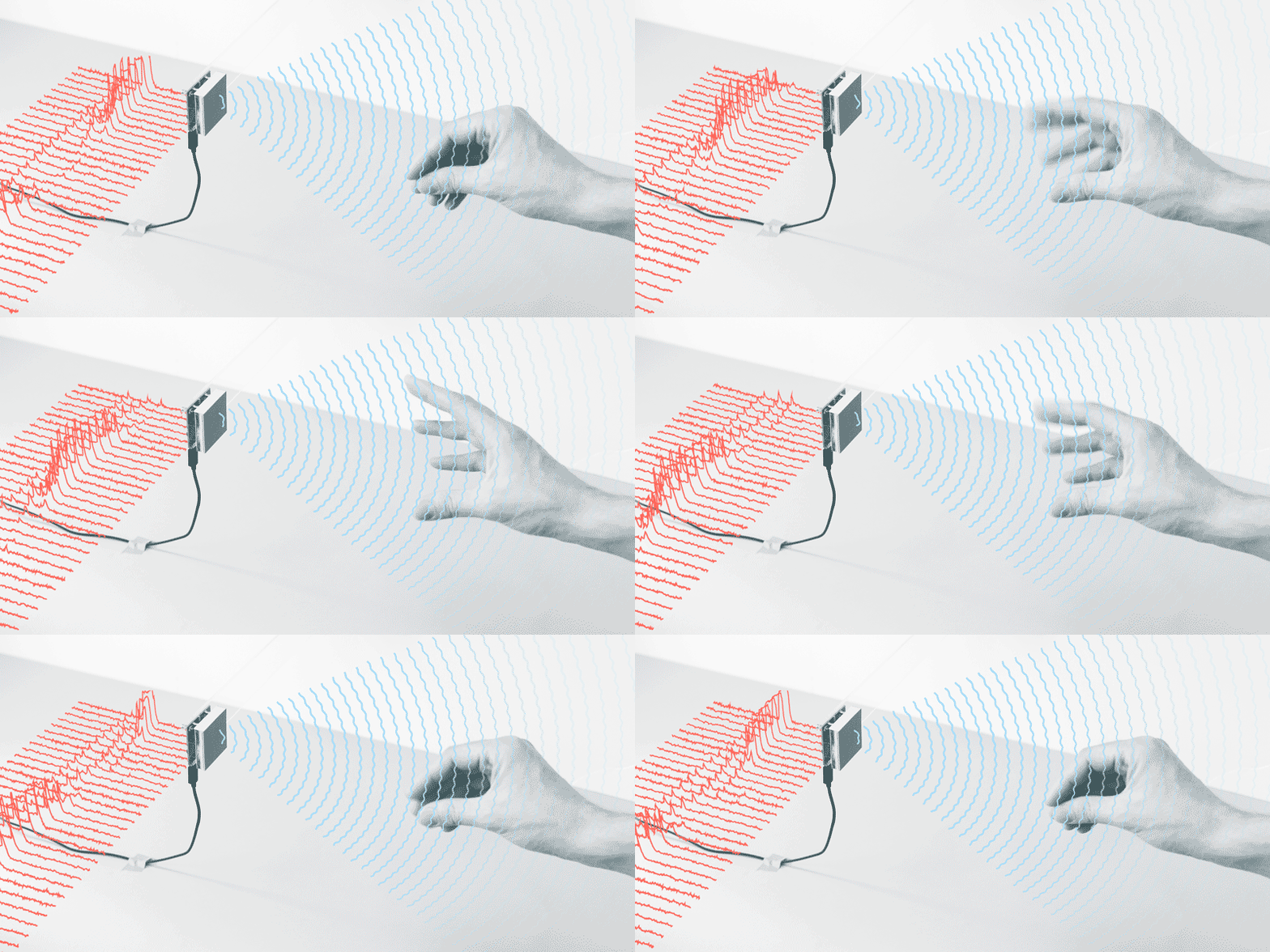
Another technology that connects products to digital applications. Soli miniaturises radar to allows users to use gestures to control digital applications or functions. From controlling digital devices like watches to controlling characters or actions in games there are many uses for the hardware. Google sees this technology replacing game controllers due to the precision of the micro-gestures that it recognises. Hand gesture movement could define how a user explores a virtual world in VR games in the future. Soli has already overcome a hurdle that stops many tech and that is miniaturising it to make it useful and unobtrusive.

With DevKits in the hands of selected partners Soli is coming up with some fascinating outcomes. University of St Andrews has used the technology to detect materials through weight and other characteristics. This gives rise to possibilities of enhanced real world interaction with games and applications.

radar-visualisation-loop.gif

Project Soli, Google ATAP

Project Tango AR: 

Project Tango was an early, and eventually unsuccessful, attempt but Google to bring AR to smartphones. The idea of utilising motion tracking, depth perception and area learning to provide AR experiences was ultimately flawed by the use of specialised hardware. Today’s ARKits use hardware already in devices to achieve astonishing results. This shows that some ideas need to be explore but that not all technology that makes a breakthrough will affect our lives and revolutionise the industry.

Nevertheless, this has led to improved consumer AR experiences that promote applications to break out from a single frame and shift the boundaries of this technology. The ability of AR and VR to transport you to different places, tell stories and create greater emotions is fascinating and the opportunities are endless. These technologies are being used to put people in scenarios or stories that alter their perception of reality.

As an iOS user I would like to start learning Swift and ARKit 2 in order to explore the possibilities of AR app development.

arkit2_lifestyle-room_06042018_big.jpg.large

ARKit 2, Apple, 2018

Conclusion:

The breadth of new technologies that will effect how we interact with apps, how we consume the information and how they are combined with hardware is truly inspiring. Over the coming modules I would like to explore this connection between software and hardware and the interplay between the two.

Creative Piece: Research and first ideas

“As long as we have each other we will not run out of problems.”

When I first heard this theme I was split between two meanings. On one hand this sounds like it is saying we will always cause problems for each other but the more I thought about it it is promoting us to interact with each other, to collaborate and to solve problems.

My first step in researching this theme was to look into the Global Game Jam 2009 where over 1000 games were created based on this theme. Cooperation and teamwork were key themes from these games as show by the game below Robots and Girl. In this game the objective is for the robots to work together to collective macaroni pieces to make a necklace for the girl. As an added layer of frustration the two robots repel each other. This game puts cooperation at the forefront of the mechanics and shows the ability to work together in a fun manner.

Screenshot 2018-09-30 at 17.56.55.png

Robots and Girl, Global Game Jam 2009

After researching the Global Game Jam 2009 and defining the meaning of the theme as cooperation and teamwork my next focus was to map out what areas I could explore in this theme, what types of solutions there could be (apps or games) and start to flesh these out into ideas. The pictures below show mind maps that go through this process of idea creation.

Screenshot 2018-09-30 at 18.09.42

Exploring cooperation, teamwork, interaction and collaboration. What areas I could explore in my creative piece and what problems it might accomplish.

Screenshot 2018-09-30 at 18.09.27

Developing the areas further and creating some ideas for apps. My focus was on connecting people together whether this was sharing skills or providing support. I believe that creating a network using technology to link people of all skills, backgrounds and interests could be a really interesting way to tackle this theme.

Next I will explore these concepts deeper, decide which route I want to go down, the format for this app, what platform and technology it would use and start to build a more detailed concept.